Category: Code

Faster Web Applications with Indexed Views

SQL Server Performance Optimization

A short introduction into 'Indexed Views' a really handy performance-improvement tool available in SQL Server.

I've generally tried to stay clear of using traditional (non-indexed) SQL Views as they severely hinder performance when building applications that query a large set of data.

Traditional SQL Views and the Problems they Cause

Here is what happens when you create a View on a large database: Typically you'll want to see data from several tables aggregated into just the results you are looking for, and while it is true that this happens, the view is a virtual query that takes up no space so every query you make to the View will be passed on to the underlying tables. Worst of all, if you try to use View in one of your stored procedures, the view needs to be fully resolved to all underlying records even if you use a WHERE clause outside it to limit a subset of data, however the same does not happen if you get rid of the View and use the same SELECT query with a WHERE clause!

SQL Views are slow because a query affects every underlying table

You can imagine that if you are trying to build a 'dashboard' on a web application that gives you some totals and gets hit every 2-3 seconds, that means that millions of rows will be traversed over and over again. This can be somehow mitigated with cached output on stored procedures but its still murder on the database.

Improving Performance with 'Indexed Views'

Now here comes the exciting bit:

  • What if you could automatically store just the records you need to create your dashboard?

That is exactly what happens when you create an index in one of your views. The data becomes materialized to disk and the results you are after are available (ie. 'cached') without having to query the underlying tables every time you are after some data.
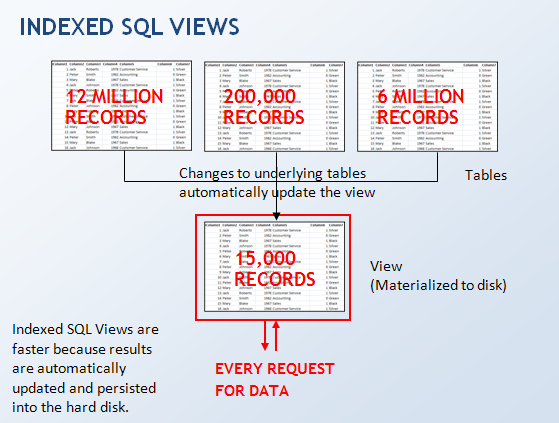
Indexed Views are faster because only the view itself gets queried.

The Downside of Using Indexed Views

Be aware that here are a couple of drawbacks in using this type of construct.

  1. First, your underlying tables become 'schema-bound', this means that you can no longer get rid of them or change their structure (add an extra column for example) without dropping the view first.
  2. Second, any insert or update into the underlying tables will be slowed down because they cause a refresh of the indexed view. This means transactions involving INSERT, DELETE or UPDATE into these tables will ideally have to be batched (ie, try to avoid inserting/updating one row at a time, insert/update many rows at a time instead)

However, in my opinion, the drawbacks may be well worth it, as most applications involve many database reads and few database writes.

More about Indexed Views

Support for Indexed Views in other database systems.

Oracle 8i and upwards have Materialized Views which are a very similar feature, MySQL however is one of those database systems that do not support Materialized (or Indexed) Views.

If you want to have similar functionality in MySQL and you use Stored Procedures for inputting data into your database, you can enhance the Stored Procedures that update/insert data by running an extra calculation at the end of the procedure that updates a summary table which acts as your view. This is essentially doing the same thing as an Indexed View but keeping it updated manually.

Hope the explanation was useful.
HTML5 Databases on iPhone

HTML5 JavaScript iPhone

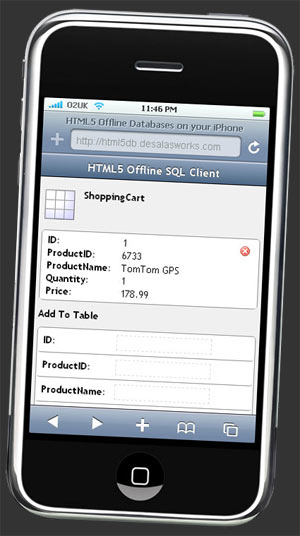
A tiny Javascript SQLite Client using the lastest W3C standards for offline storage.

I've just written this neat SQL Client using Javascript and SQLite.

HTML5 SQL Client running on iPhone

Since the iPhone browser is based on Webkit, which supports the latest W3C standards, its possible to create a SQL Client simply using Javascript.

The SQLite database is hosted by the browser process this means that it runs even when disconnected from the internet.

The following browsers are currently supporting HTML5 standards for database storage:

  • Google Chrome
  • Safari
  • Opera

To access this SQL Client on your own iPhone:

  1. Open up Safari
  2. Type html5db.desalasworks.com into the location bar
  3. Press "Go". Thats it!

Otherwise you can also open it in your desktop browser by clicking the link above.

Update January 2016 - WebSQLDump: Are you looking to export an existing WebSQL database?

This project has spawned a separate library to extract the contents of a WebSQL database hosted on the client.

https://github.com/sdesalas/websqldump

The syntax is as follows:

websqldump.export({database: 'NorthwindLite'});

AJAX database access in C# - The simple way

C# XML SQL Server

Today, I'm going to throw the Microsoft textbook out the window and show you a really easy way to get your database records into a JavaScript application. Minimal hassle - maximum bang for your buck.

First, I'm assuming you chose a JavaScript framework such as Ext JS, Dojo, Yahoo UI, JQuery or any other fine library for your front-end widgets. If so then congratulations, this article is just for you.

The trick is to leave the middle-tier c# layer as thin as possible, implementing only the things your client layer cant do reliably: Security and Data Access.

In this example I am only showing how to write minimal code for Data Access, Security is too long a topic for a single article.

READING FROM THE DATABASE

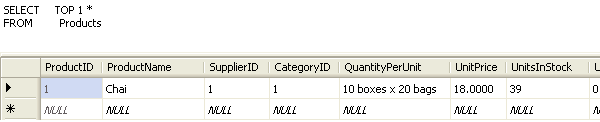
Say you have a database with products in it. For this example I am using the Northwind database:


Here is some C# code I wrote earlier to open up the database and read the first record. If you want some examples of valid connection strings you can look here and here.

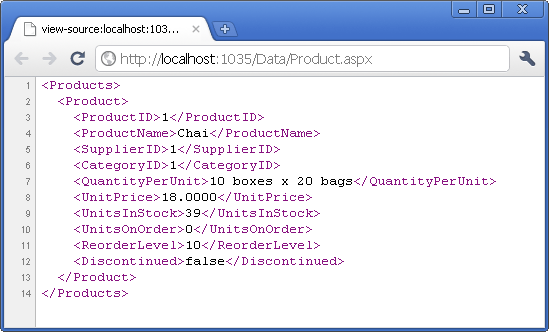
Here is the output when you run this code in your browser:

The magic here happens in lines 32 and 38.

Line 32 uses DataTable.Load() to get the database contents into a .NET data table as follows:

32     table.Load(reader, LoadOption.Upsert);

Line 38 uses the DataTable.WriteXml() method to write the contents of the table in XML format as a HTTP response.

38     table.WriteXml(writer);

Now in order to go one step further, your AJAX application needs to read INDIVIDUAL records, that means one at a time, and show them to the user.

Here is some modifications I made to the earlier code for this purpose:

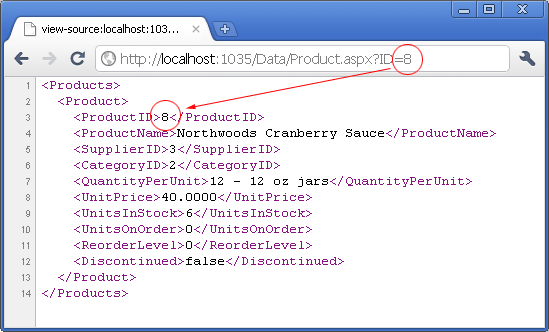
And if you run this code and insert a "?ID=8" at the end of your request (which you can easily append within javascript) you get the following result:

And thats it.

So where is the trick? Is that everything?

Ahh.. For those accustomed to programming ASP.NET I guess it comes as a bit of a surprise that it would be so easy to get XML formatted records out to the client layer.

Surely there has to be a catch somewhere? ... A WCF service with implemented data contracts? An Object-Relational Mapping framework operating behind the scenes? Or at least a strongly typed Collection using Generics?

Nope, thats it. You can do this the hard way, but that's not why you are reading this article. So now you can take off your C# hat and put on the JavaScript one because the rest of the logic goes on the client layer so that users can get the most of their UI experience.

SOURCE CODE

Here is the source code I used in this example, there are 2 files here: Product.aspx and Product.aspx.cs (code-behind) so I've zipped them up into this archive:

Product.aspx.zip

You are free to copy the code here but since you are not paying me for it I accept no liability if your site goes topsy-turvy. One more free tip, if you are going to put this into production you may want to use a Generic Handler (.ashx file) instead, its more light-weight and you don't need all the functionality in the Page class.

Please note: I've left you the section "WRITING TO THE DATABASE" for a separate article.

Secure HTTP in IIS with SelfSSL

Its fairly easy to setup https functionality when you're running an Apache web server however when trying to do the same thing in IIS you will encounter the problem of generating a certificate and having to rely on a Certification Authority such as Verisign or your own certification server to have the certificate authorised.

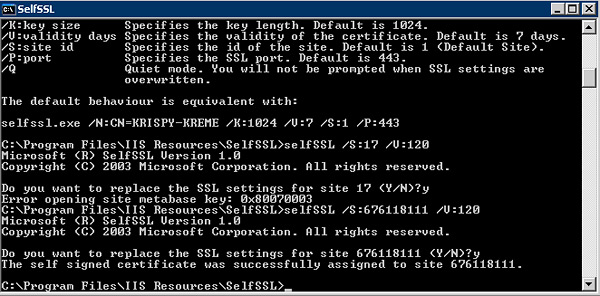
This problem is easily solved with Microsoft SelfSSL utility, which can be downloaded here. It will only install under XP or Windows 2003 however you can copy the SelfSSL.exe file directly into a 2000 computer and run it without a problem.

A typical command option you can run (this will give you a certificate valid for 120 days) is:

selfssl.exe /N:CN=(computername) /K:1024 /V:120 /S:1

And thats it! This will take care of the certificate generation and installation. Watch out if you are running multiple Web Sites under the one server as you will have to fiddle with the /s tag to point the SSL certificate in the right direction.

Logging SOAP Messages In .NET

NET Framework Web Services C# SOAP

C# Web Services provide an easy interface to incoming SOAP data because the SOAP message has already been deserialised at the entry point of a WebMethod.

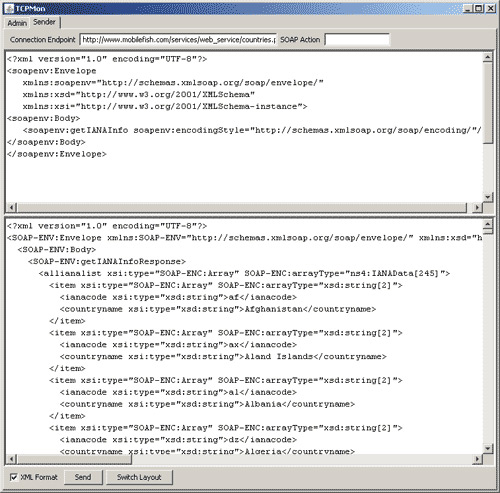
The downside is that sometimes you'll need to have access to the full SOAP request: body, headers and everything for tasks such as diagnosing any errors (which message broke the web service) or providing graceful handling of third party web services.

At first you'd think that the Request object can provide this information with methods such as Request.BinaryRead() but unfortunately when you're using SOAP all you get there is a querystring.

The solution here is to use the SOAP Extensions. Here is some sample code:

public class SoapMessageLogger : SoapExtension
{
//...
public override void ProcessMessage(SoapMessage message)
{
switch(message.Stage)
{
case SoapMessageStage.BeforeDeserialize:
LogResponse(message); break;
case SoapMessageStage.AfterSerialize:
LogResponse(message); break;

// Do nothing on other states
case SoapMessageStage.AfterDeserialize;
case SoapMessageStage.BeforeSerialize;
default: break;
}
}
//...
}

More info on this can be found here and here.

WordPress Compression Plugin

Wordpress PHP

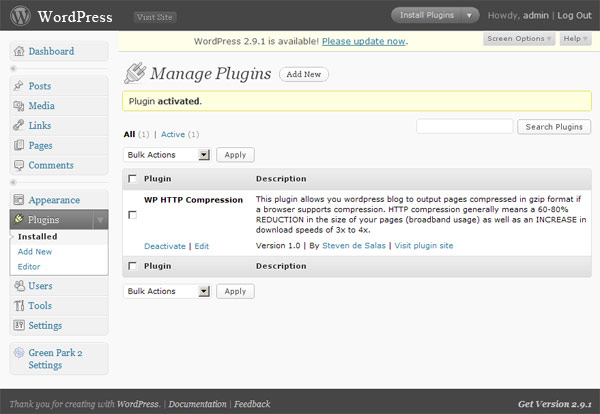
This plugin allows your WordPress blog to output pages compressed in gzip format if a browser supports compression.

Plugin Homepage

You can now find the plugin listed in Wordpress.org.

Coding the Plugin

  • I noticed once I installed WordPress and started using it for desalasworks.com that it does not support gzip HTTP compression, apparently this support was removed from version 2.5 onwards.
  • HTTP Compression is a no-brainer for optimising your blog. HTTP compression generally means a 60-80% reduction in page size (and broadband usage) as well as an increase in download speeds of 3x to 4x.
  • As of January 2010, more than 99% of browsers support compression. For the less than 1% that do not, WordPress will still send them uncompressed pages.
  • Having already enabled compression on my own VisualSite (.NET) Content Management System I decided to write a plugin for WordPress to enable this as well.
  • The key component of the plugin is a call to the zlib PHP compression library as follows
    • if(!ob_start("ob_gzhandler")) ob_start();
  • For more information have a look here: PHP ob_gzhandler

Download The Plugin

Installing the Plugin

  1. Download the `wp-http-compression.zip` plugin to your desktop.
  2. Navigate to the 'Plugins' menu in Wordpress
  3. Click 'Add New'.
  4. Select 'Upload' from the options at top of the page.
  5. Select the file `wp-http-compression.1.0.zip` and press 'Install Now'.
  6. You should get a message saying 'Plugin Installed successfully'.
  7. Activate the plugin.
  8. Go to http://ismyblogworking.com/ to test compression
  9. Check "Page GZip" on the right hand size.
  10. Check "Bandwidth saved by compression" on the left hand side.